
Pollinator Count - Expanded
This version of the Pollinator Count offers a choice of a five or 10-minute count and 10 groups of insects to identify.
Start exploring insects and the flowers they are visiting by taking part in this simple, timed survey. It has been specifically designed for young people, with no need for prior insect or plant identification experience.
Many insects visit flowers to feed on nectar or collect pollen – the abundance of insects in your outdoor spaces is a clear indicator of the health of your habitats. Learners will see which plants are best for different insects and can use this information to identify where improvements can be made on site.
Together, the data collected by you and others will show how educational settings support wildlife. At the Natural History Museum, researcher Dr Victoria Burton will analyse this information to assess the health of pollinators across the Nature Park and to explore which habitats and flowers best support pollinators. For more about the science behind the Pollinator Count, visit our blog post.
This survey is based on the UK Pollinator Monitoring Scheme (PoMS) Flower-Insect Timed Count (FIT Count) method, adapted with their support. Learn more about UK PoMS and take part in FIT Counts anywhere by visiting UK Pollinator Monitoring Scheme
Preparation
What you need:
- flowering plants on your site
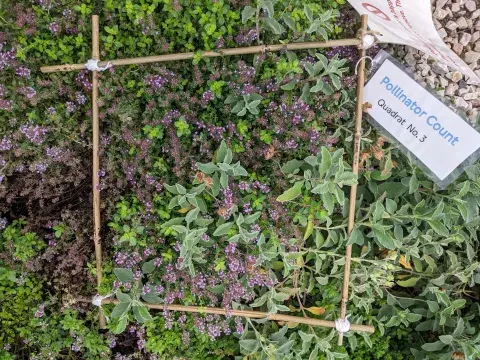
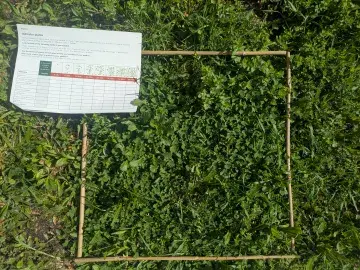
- 50cm x 50cm quadrats (home-made or shop bought) or 55-60cm hoops
- smartphones or tablets with the Pollinator Count survey open (make sure you are signed into your Nature Park account and either scan the QR code or press the ‘launch activity’ button above)
- printed resources: insect recording sheets and insect guides
- clipboards and pencils
- stopwatches or timers
if not using mobile devices:
- cameras to take a photograph of your quadrat
- printed survey forms
To upload your results, your site must already be on the Nature Park Map. Add it to the Map by drawing your site boundary (5 mins).
Access the count

Location
Outdoors
Useful guidance
Resources
Before the activity
Ensure you have mapped the habitats on your site before carrying out your Pollinator Count. Review your site’s habitat map with learners and decide where to carry out the Pollinator Counts. The supporting guidance document sets out options for this, such as comparing different habitats.
We suggest you schedule two sessions: if weather conditions are not appropriate on the first session, you can use that time to practice insect identification. If you can carry out the Pollinator Count on the first session, then you can either repeat the survey or carry out data analysis in the second session.
Step by step
- Introduce the activity to your group, distribute the materials and briefly study the insect identification guides. You can use the PowerPoint to help prepare your learners. It introduces some of the questions the data from the count can answer, covers how to do the count, how to identify the different insect groups and what happens with the data.
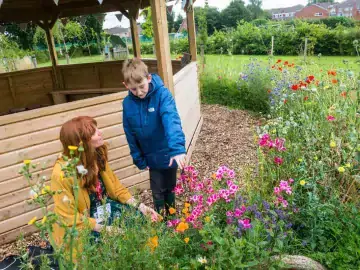
- Get outside with your learners and place 50cm x 50cm quadrats over patches of flowers in the chosen habitats - a maximum of three young people per quadrat.
- Choose one type of flower in the quadrat as the ‘chosen flower’ type to watch for visiting insects during the survey.
- Ensure each group has a mobile device with the Pollinator Count Survey open. Make sure you are logged in to the Nature Park website and either select the 'launch activity' button at the top of this page or scan the QR code to access the survey.
Ask learners to:
-check that their location is correct on the map in the survey
-select which type of habitat they are in
-take photographs of the flowers and leaves, using the app
-answer the questions about the date and time
- When ready to carry out the Pollinator Count, each group will start a timer for 5 or 10 minutes
- Ask learners to use the Insect Recording Sheet to record how many of each type of insect LANDS on the ‘chosen flowers’.
- Learners will then answer the questions that follow about the weather conditions.
- Ask learners to have a go at identifying the ‘chosen flower’ – what do they think it is called? Do they know its scientific name?
- Learners will then record the quantity and coverage of the ‘chosen flower’ and any other flowers.
- If you like, complete the insect identification challenge. This simple activity allows researchers to confirm the data accuracy when analysing the results.
(If carrying out the Pollinator Count without mobile devices, learners will carry out steps 5-11 using the printed survey form instead)
If you have carried out the Pollinator Count without mobile devices, head back to the classroom to enter your survey results from your printed forms and upload your photos using a computer. Submitting your data lets you see how you're boosting biodiversity, contributes to the National Education Nature Park, and brings real-world science into your classroom.
Reflection
Ask learners to review the total number of insects they recorded and the different types. Invite them to discuss which flowers and which locations had the most insects. Why do they think that might be?
Why not repeat the survey in different areas or at different times? This provides a great opportunity for learners to compare different habitats and will help to build a richer dataset and support learning through investigation. Learners can also explore the impact of changes made to benefit nature, such as comparing an area that has been improved with one that hasn't yet.
To view the results of both your expanded Pollinator Counts and the results of others please go to the Nature Park Map and add the 'Pollinator Count - Expanded' layer.
Curriculum links
This is a community science activity that contributes directly to real scientific research for the Nature Park. Taking part in the activity can aid development of working scientifically, geography fieldwork and citizenship skills alongside consolidating science curriculum knowledge and enhancing nature education.
What to try next
Tracking changes on your site
Begin activityThree ways to share your findings
Begin activity